
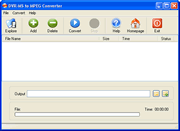
How to convert drv-ms to mpeg ?DVR-MS Converter is easy-to-use tool to convert DVR-MS file to MPEG2 file with super faster speed , user can batch convert dvr-ms files with on-click. It is faster, convert 1G dvr-ms file within a few minutes. the mpeg2 file is DVD compatible that user can create TV show DVD. 1. Download DVR-MS to Mpeg Converter 2. Run DVR-Ms Converter
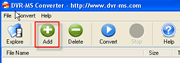
3. Click Add button to add DVR-Ms file in filelist
4. Click Convert button to convert 5. You will find mpeg files in Output folder Other LinksCopyright : www.dvr-ms.com Modified : 2009-01-06 14:44:45
|
Products |



Copyright © 2005-2008 DVRSoft. All rights reserved.